
-

Jon Eiseman wrote a new post 3 years, 8 months ago
A Car Hits You While You Are On A Club Ride – What you Need to Know About Medical BillsA Car Hits You While You Are On A Club Ride – What you Need to Know About Medical Bills You are on a Club ride and a car hits you. One thing is for sure: you will need to get medical treatment and to pay for it. That, and nothing else, is the subject of this article1. And although I am an attorney licensed in the State of New Jersey, this article is not intended as legal advice and should not be taken as such. My purpose in writing is to help you navigate the system intelligently by knowing who is supposed to pay what.I write on the assumption that you are covered by a New Jersey auto insurance policy for a passenger vehicle2. If this is not so, this article is irrelevant to you.First Important Fact: in New Jersey, your own auto insurer is primarily responsible for paying for your injuries from auto accidents. Your auto insurer. Not your medical/Medicare insurer. Not the “at fault” party’s insurer; New Jersey is a “no-fault” auto insurance state. Thus, if you are covered by a New Jersey auto insurance policy and you are injured in an auto accident, you should first look to your auto insurance carrier.Second Important Fact: some New Jersey physicians will not treat auto accident victims. This is because those doctors do not accept the compensation set by the “Personal Injury Protection (PIP)” coverage that an auto accident victim gets from his or her auto insurance. (The New Jersey Department of Banking and Insurance promulgates a PIP fee schedule that specifies what a doctor gets paid for specified medical services rendered to a patient who has been in an auto accident. As you may imagine, this schedule is not particularly generous.) If you are making an appointment with a doctor to address post-auto accident medical care, make sure the office knows that an auto accident was the cause! If you accept treatment from that doctor and the doctor’s office has not made appropriate arrangements with your auto insurance carrier, the carrier may refuse to pay and you will be on the hook3.Third Important Fact: your medical insurance carrier, or Medicare, is secondarily liable for paying what your auto carrier is not required to pay. If – as will usually be the case – you end up with a balance due even after your auto carrier has paid the appropriate amount to your doctor, you should submit that balance to your medical insurance carrier. When you do this, you will need to provide evidence of what your doctor did and charged for and what your auto insurance carrier paid the doctor. Your medical insurance carrier/Medicare will pay benefits in accordance with its contractual/statutory obligations to you.On this issue, you need to know that some providers of medical services don’t play by these rules. In my case, I was taken to Morristown Hospital by an ambulance service, and you would think that an ambulance service would have the experience to know that it should bill my auto insurance carrier first. It didn’t. It billed my medical insurance carrier, which paid, and it then came after me to pay the unpaid balance of its charges. I told the service that it had made a mistake, and it ignored me. (I am used to this!) I got my auto insurance carrier involved, and the claims manager said this happens all the time. She took the matter on, and I have not heard further.Fourth Important Fact: you are covered by the Club’s insurance policy! When you report your accident to the Club’s Safety Coordinator (currently Drew Thrain) he will provide you with a claim form. You provide the information they request and they process your claim.Summary: in all likelihood, if you are unfortunate enough to be struck by a car while you are on a Club ride, you will be covered by three diRead more
-
Jon Eiseman added the event RAGBRAI 4 years, 2 months ago
-
Jon Eiseman created the group
 RAGBRAI 4 years, 2 months ago
 -
Jon Eiseman wrote a new post 4 years, 5 months ago
-
Jon Eiseman posted a new activity comment 4 years, 10 months ago
The board voted today to allow up to 15 on a ride and to allow rides to be scheduled 15 minutes apart (at a particular start location). I have made that change.
-
Jon Eiseman wrote a new post 4 years, 11 months ago
-
Jon Eiseman posted a new activity comment 5 years, 1 month ago
I added a note that Lakeside Bagels is now closed on Sundays. I also added this note on the tours that mention Lakeside Bagel as a food stop.
-

Thank you. I did phone them later and was told that they expect to resume to be open on Sunday when the pandemic restrictions are over.
-
-
Jon Eiseman posted a new activity comment 5 years, 1 month ago
I found the cause of the problem and fixed it. No settings on Chrome need to be modified. This downloads were only blocked for some of the tours. It would fail when the link started with “http:” instead of “https:”. I made sure all the links now use https: and that solves the problem!
-
Jon Eiseman posted a new activity comment 5 years, 1 month ago
Hi George,
I think this is some kind of Chrome security check that prevents downloads of files from another site. In this case the file is coming from the RideWithGPS site. I am able to download the files with no problem on Chrome. Although I have seen that security prompt in the past. To prevent this from happening in Chrome go to…[Read more]-
Thanks.
-
Well, I was already at “no protection.”
-
But, for whatever reason, it works now!
-
I found the cause of the problem and fixed it. No settings on Chrome need to be modified. This downloads were only blocked for some of the tours. It would fail when the link started with “http:” instead of “https:”. I made sure all the links now use https: and that solves the problem!
-
-
-
-
-
Jon Eiseman posted a new activity comment 5 years, 2 months ago
In addition (by default) you will receive an email every time someone posts a message to any group you have joined. For more information on Groups check out the Groups Quick Start Guide: https://mafw.org/staging/groups-quick-start-guide/
-
Great. The guide gives some good information. Thanks for putting the comments on the front page. Stay safe in this coming snow. I’ll be frolicking in my nearby woods on my cross country skiis.
-
-
Jon Eiseman posted a new activity comment 5 years, 2 months ago
I added a feed for groups on the front page underneath the forums listing. You can click on the Group Name to go to the groups page or you can directly add a comment while still on the front page.
-
In addition (by default) you will receive an email every time someone posts a message to any group you have joined. For more information on Groups check out the Groups Quick Start Guide: https://mafw.org/staging/groups-quick-start-guide/
-
Great. The guide gives some good information. Thanks for putting the comments on the front page. Stay safe in this coming snow. I’ll be frolicking in my nearby woods on my cross country skiis.
-
-
-
Jon Eiseman posted an update in the group
 Website Feedback 5 years, 3 months ago
You can add/change any ride comments by clicking on Update Ride for any of your scheduled rides. Send an email to Manny (our Ride Coordinator) and ask him to include information about the ride in his regular email broadcast.
Jon-
Thank you
-
-
Jon Eiseman replied to the topic Air Compressor in the forum Bicycles 5 years, 5 months ago
The Ryobi 737D looks interesting to me since I already have 2 batteries and a charger for the Ryobi drill. Here’s a review: https://www.youtube.com/watch?v=fzN04gdmgC4
They have the inflator without the battery and charger for $37 at Home Depot:…[Read more]
-
Jon Eiseman created the group
 Meetups 5 years, 5 months ago
 -
Jon Eiseman replied to the topic Di2 charging interval in the forum Bicycles 5 years, 6 months ago
I found some information on how often to charge the di2 here: https://bettershifting.com/di2-for-dummies-beginners-guide-to-di2-manual/#howoftendoichargemybikeandhow
It shows you how to check the charge level so you will know far in advance when you need to charge it.
-
Jon Eiseman replied to the topic 7-Day Schedule in the forum New Website 5 years, 6 months ago
You can now bookmark the ride schedule page to go directly to that page. When you click on Schedule from the Ride menu it will bring you to the following page: https://mafw.org/staging/ride-list/?daterange=default and you can bookmark that page.
-
Jon Eiseman started the topic Neck Gaiter in the forum Tips for staying safe 5 years, 6 months ago
-
Jon Eiseman started the topic Website Improvements 7/22/20 in the forum New Website 5 years, 7 months ago
I have made the following improvements on the website:
- You can put yourself on the wait list for more than one ride if you’re not already signed up for a ride around that time. When you sign up for a ride (or get moved to the sign-up list from the wait list) you will automatically be removed from the wait list from any other rides around t…
-
Jon Eiseman replied to the topic Change in start time in the forum New Website 5 years, 8 months ago
You need to send a request to the Ride Coordinator to change the start time.
-
Jon Eiseman replied to the topic How to print sign in sheet? in the forum New Website 5 years, 8 months ago
Hover over the “My Rides” menu and then click on “My Rides” this will bring you to a page with a list of your scheduled rides (including rides that need to be updated).
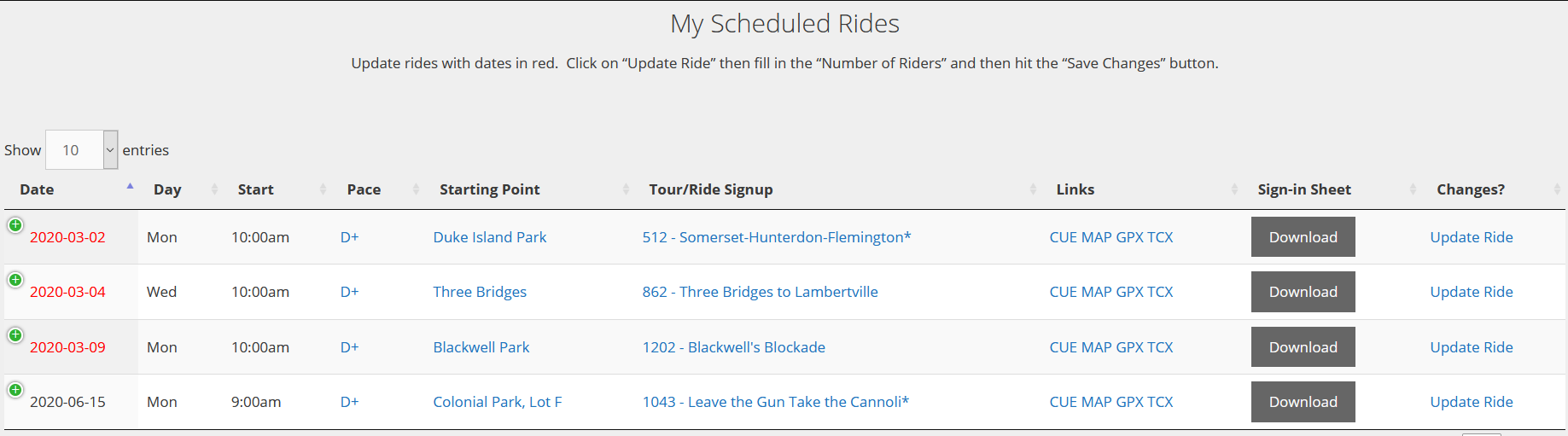
Just click on the “Download” button to download the sign-in sheet. Once the ride is finished, click on “Update Ride” to specify the number of riders that attended the ride.
To…[Read more]
- Load More







Thanks Mark I had no idea these are the steps you would follow. I would have assumed I go to my healthcare provider and that would be it. Now deductibles in network not going to happen in the hospital and out of network I would be on the hook for a good amount of the bills.